Revised: 10/2020
Tax tables and information used
in computing payroll. These tables reflect your local income tax rate, if
applicable and are maintained by the client. There is not automated update for
the Local Tax Table, this must be manually updated, as needed.
Adjusting
Local Tax Table:
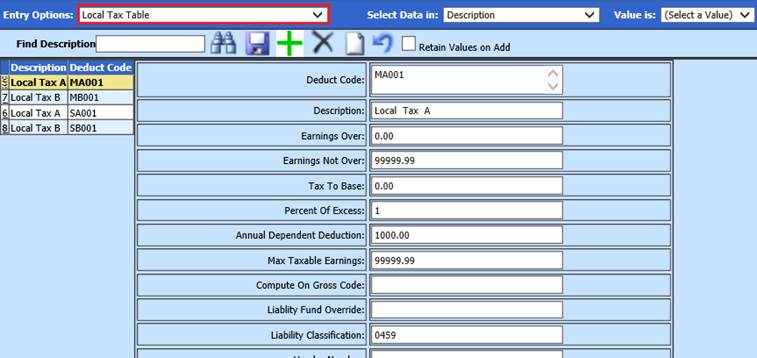
1. Select Master File and Code Entry Options
2. Select Master File Data Vertical Entry and Changes
3. Entry Options, Local Tax Table
4. Select  to add
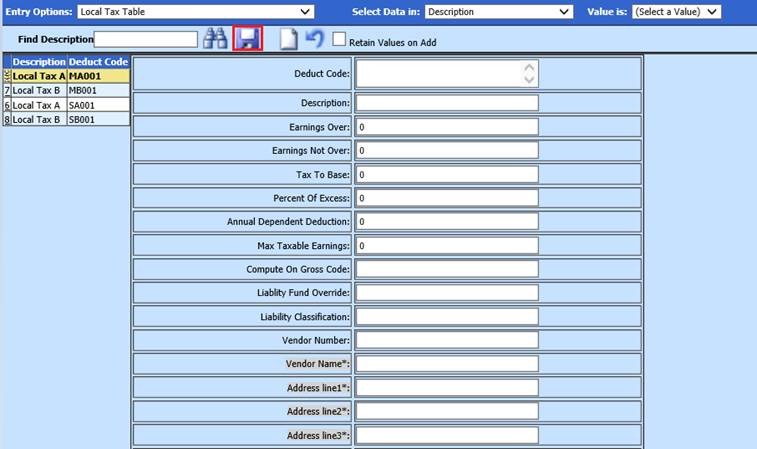
5. Enter new Information
•Deduct Code: Enter Code
•Description: Enter Description of new Code
•Earnings Over: Enter amount
•Earnings Not Over: Enter amount
•Tax to Base: Enter 0.00
•Percent of Excess: Enter percent
•Annual Dependen Deduction: Enter amount
•Max Taxable Earnings: Enter 99999.99
•Liability Classification: Enter Liability Code
•Vendor Number: Enter Vendor Number from Vendor Master table
•Vendor Name: Enter Vendor Name
•Address line 1-3: Enter Vendor Address
6. Select Save