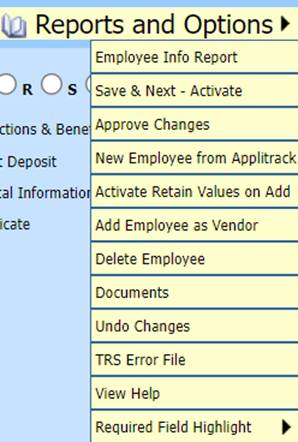
The areas under Reports and Options can be selected by hovering over the words and then select which option you would like to use:
Each option defined:
•Employee Info Report: Report to include all employee demographic information.
•Save & Next – Activate: Upon entry on multiple employee’s data, you can activate this option and upon Save it will advance to the next employee.
•Approve Changes: Approve any Employee Portal Requests.
•New Employee from Applitrack: Import new employee from Applitrack.
•Activate Retain Values on Add: Activate the copy option to clone another employee’s information to the new employee.
•Add Employee as a Vendor: Activate this option in SDS Web Office setting and you can transfer the Employee information to the Vendor table.
•Delete Employee: If you have entered in an employee incorrectly and need to delete.
•Documents: Uploading and saving any employee documentation.
•Undo Changes: Undo the changes you have made to the employee.
•View Help: Access to Finance Help counsel.
•Required Field Highlight: Adjust the brightness of the highlighted state required fields (above using Light background, below using Bright background).
